Mirri One™ is live on the App Store and Google Play — free to try
Mirri One A Mirri Diabetes product ↗ Get the app
For people living with type 1

Navigate T1D with more confidence.

How much, how long ago, what’s still working. Mirri One puts the answers on one screen and tunes your insulin-to-carb ratio against what actually happened — so more of your day is something you can see, not guess.


Download on the App Store Get it on Google Play Try the Mini demo
Free to try · iPhone and Android · works with your CGM
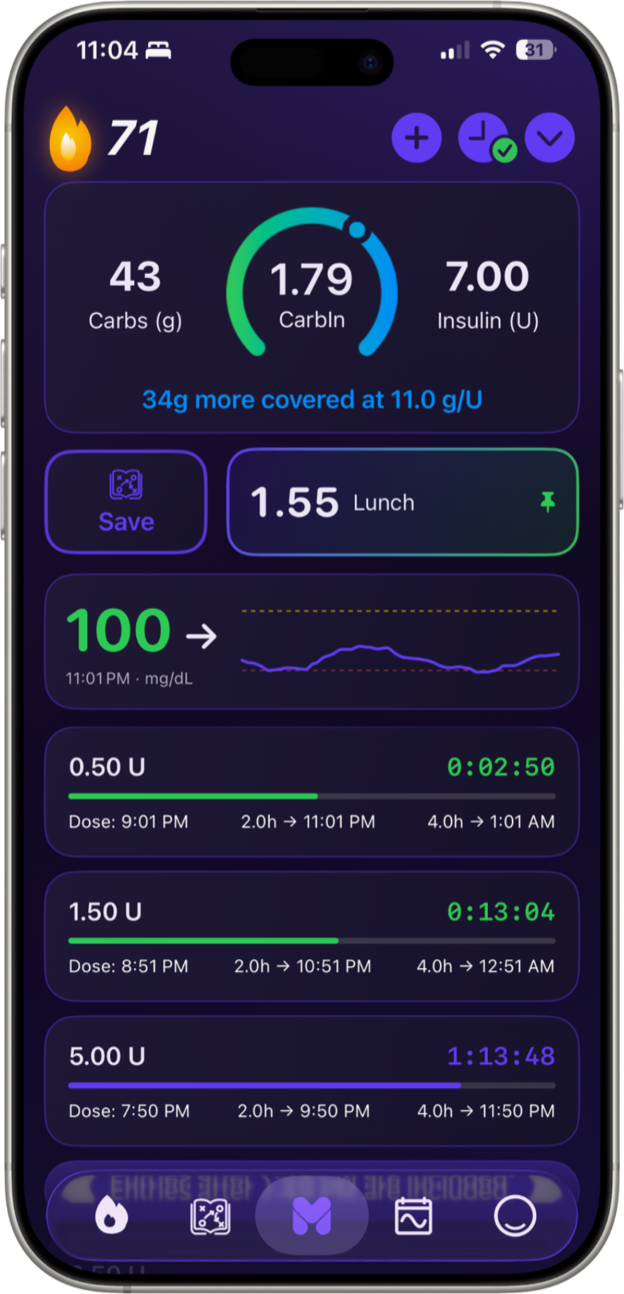
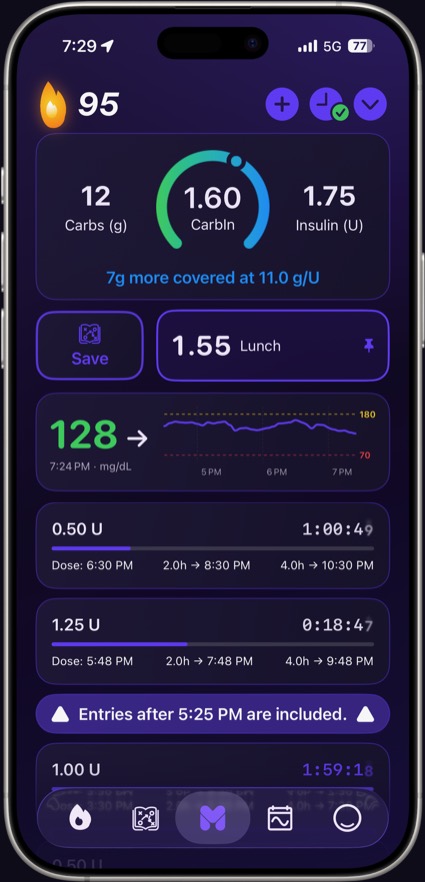
The Mirri One home screen on iPhone — CarbIn gauge, current glucose, and ShotClock doses
The questions that run all day

Three questions, always on your mind.

Am I covered? CarbIn 1.90

One number for how your insulin coverage compares to the carbs you've eaten, at your own ratio.

What's still working? ShotClock 1:52:00

A four-hour bar and countdown on every dose — the insulin still working, on screen instead of in your head.

What worked last time? The Playbook 0.85

The real days that worked, saved and ready to replay.

Log anything
Two taps now. The whole picture later.
22g carbs 3.80 U bolus 0.70 · Morning practice Low treated · 15g 135 mg/dL · steady 70-day streak Cycle day 14 0.85 · Pizza night 2.0h check-in 1.33 · School lunch
After every meal

“Did I take enough?”

One number for how your coverage compares to the carbs you’ve eaten, at your own ratio. The gauge moves as doses land; the line below shows how many grams you’re ahead or behind.

Coverage at a glance
22
Carbs (g)
1.90
CarbIn
3.80
Insulin (U)
20g more covered at 11.0 g/U
22g carbs · 3.80 U → 20g ahead
Active doses
0.50 U 1:52:00
Dose: 10:18 PM2.0h → 12:18 AM4.0h → 2:18 AM
3.30 U 0:05:00
Dose: 8:31 PM2.0h → 10:31 PM4.0h → 12:31 AM
1.50 U 0:54:00
Dose: 7:20 PM2.0h → 9:20 PM4.0h → 11:20 PM
Fresh Working Check window
Live Activities on your lock screen
Before every correction

“How much is still working?”

Every dose gets its own four-hour clock, so what’s still working is on the screen instead of in your memory. The color changes with each phase — fresh, working, check window. What you do with that is between you and your care team.

The days that worked

Solve your treatment for pizza night once.

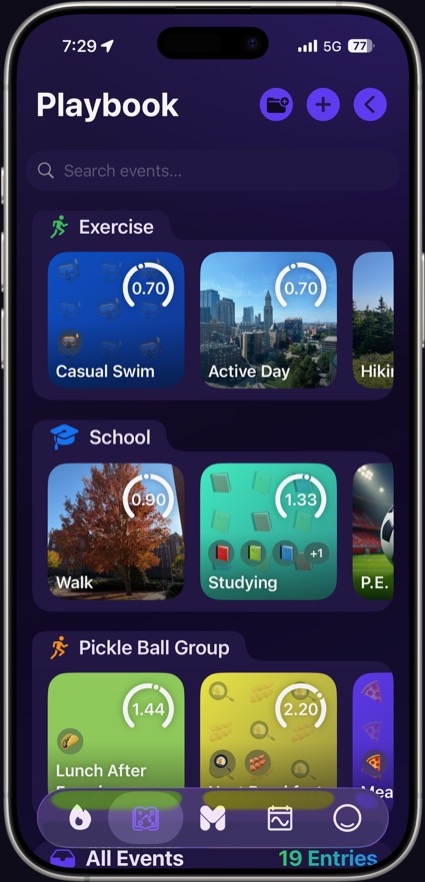
Some days just work. The Playbook saves them, each stamped with its CarbIn, so the next pizza night starts from the one that went well instead of from scratch.

Search plays…
All Exercise School
0.70
Morning practice Exercise · 45g carbs · 2.9 U
1.33
School lunch School · 58g carbs · 7.0 U
0.85
Pizza night Food · 74g carbs · 5.7 U
Pin a play · replay a day
Apple Watch

Without reaching for your phone.

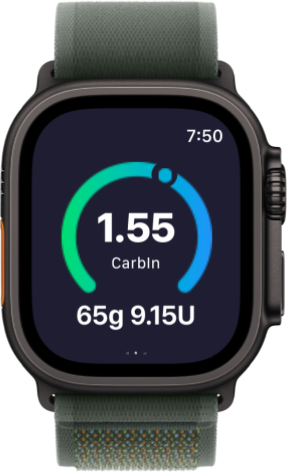
The same CarbIn gauge, on your wrist — your carbs and units in one glance, no phone out of your pocket. Doses and meals you log keep the wrist current on their own.

Mirri One on Apple Watch — the CarbIn gauge reading 1.55, with 65g and 9.15U below it Straight from the wrist
Cycle

Some of the swing isn’t the food.

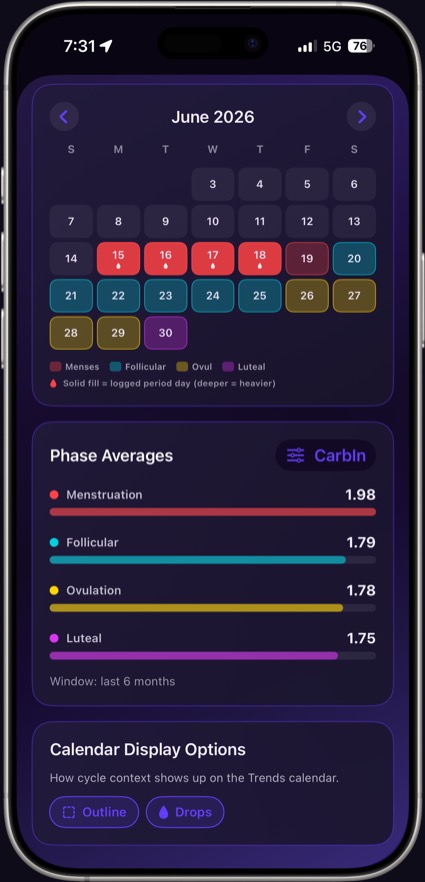
Many people notice their glucose moves with their cycle. Mirri One lines cycle data up with your CarbIn and shows the average for each phase, so the pattern is something you can see rather than something you suspect.

Menses, follicular, ovulation and luteal, each with its own CarbIn average.
Read from Health, with your permission — nothing to log twice.
Phase context on the Trends calendar, as an outline or a drop.
Mirri One cycle view: a June calendar with each phase colored, and phase averages of 1.98, 1.79, 1.78 and 1.75 CarbIn
Low Low Mode

When you're low, math is the last thing you can do. Low Mode gets out of the way — a simplified screen for treating first and logging after, with nothing to calculate in the moment.

Relay Coming soon
Mirri Relay

End-to-end-encrypted sharing with the people who help. Join a camp by QR code or share 1:1 with a parent — the server only ever sees ciphertext.

Screens

Every tab, as it ships.

Real captures from the app on iPhone — not mockups. Scroll across.

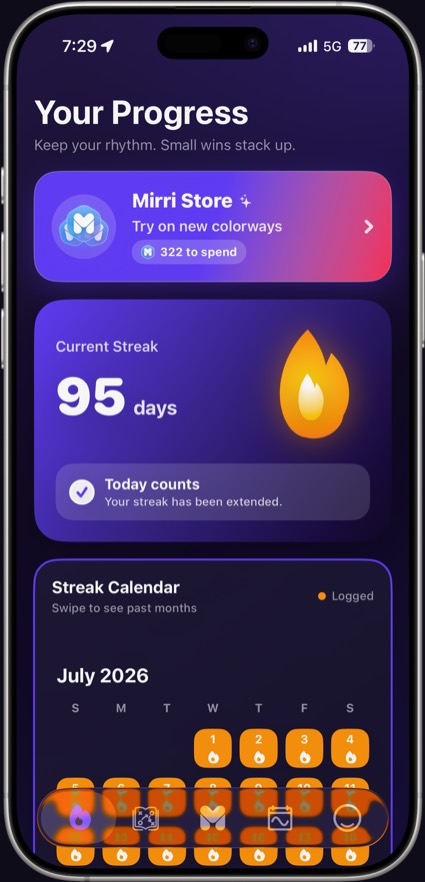
Mirri One — the Progress screen
ProgressStreaks, the calendar, and the Mirri Store.
Mirri One — the Playbook screen
PlaybookSaved days, sorted into your own categories.
Mirri One — the Home screen
HomeCarbIn, glucose and every live ShotClock.
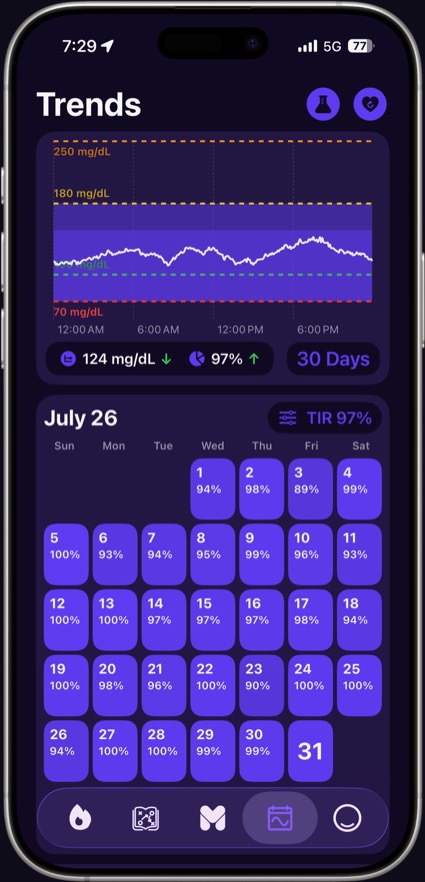
Mirri One — the Trends screen
TrendsTime in range, day by day.
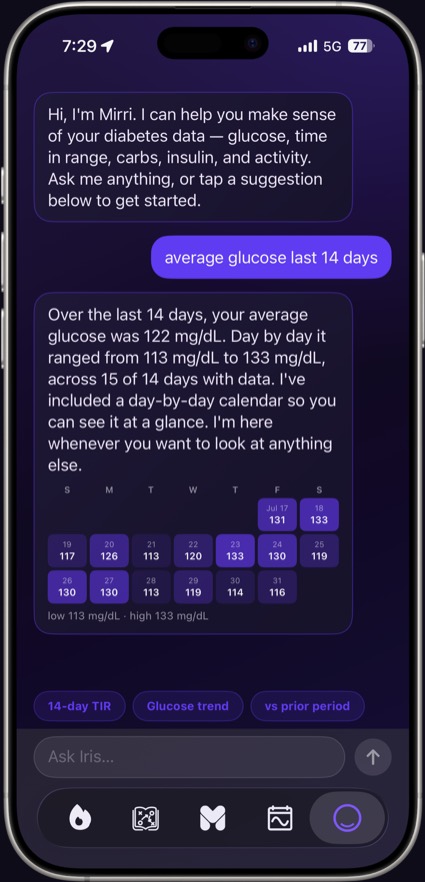
Mirri One — the Iris screen
IrisAsk questions about your own data.
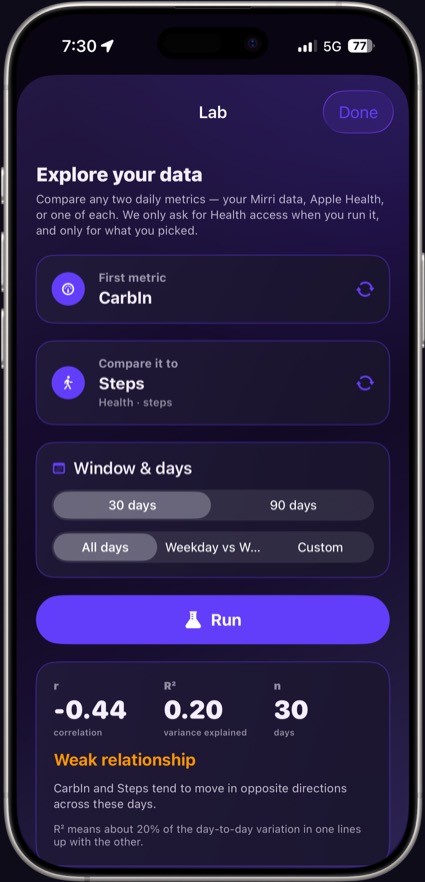
Mirri One — the Lab screen
LabCompare any two metrics, yours or Health’s.
Mirri One — the Cycle screen
CyclePhase averages against your CarbIn.
Mirri One Mini demo

Take Mirri One Mini for a spin.

A working simulation of the real home screen, in your browser, on made-up data. Time runs ~20× faster so doses play out in minutes. It’s a small slice — the real app does considerably more.

Things to try
1
Watch the glucose card
Fresh (fake) CGM readings land every 15 seconds or so — number, arrow, and sparkline all move.
2
Log an entry
Tap the purple + and add carbs or insulin — the CarbIn gauge and coverage line recompute instantly.
3
Watch the ShotClock
Every dose gets its own countdown and progress bar. Log a new one and watch it join the list.
4
Pin a play
Open the Playbook tab and tap a saved day — it pins to the home screen like the real app.

Fake data, generated on this page — no accounts, no servers, nothing leaves your browser.

10:26 PMDEMO ~20×
Home
70 +
1.55 Lunch Pinned
Current glucose 13510:26 PM · mg/dL · →
22
Carbs (g)
1.90
CarbIn
3.80
Insulin (U)
20g more covered at 11.0 g/U
0.50 U1:55:00
Dose: 10:21 PM2.0h → 12:21 AM4.0h → 2:21 AM
3.30 U0:08:00
Dose: 8:34 PM2.0h → 10:34 PM4.0h → 12:34 AM
1.50 U0:57:00
Dose: 7:23 PM2.0h → 9:23 PM4.0h → 11:23 PM
10:26 PM · demo time ~20×

Put Mirri One in your pocket.

Free to try on iPhone and Android. Your data stays yours.

Download on the App Store Get it on Google Play Play with the Mini demo first
Still have questions? Read the FAQ
Beta software

Mirri One is in active beta. Some features shown on this page and in the demo — including Mirri Relay sharing — are still in development and may change, ship later, or look different in the App Store build. The Mirri One Mini demo above is a simulation with fake data, not a recording of the shipping app.

Not medical advice

This application and its contents are provided for informational purposes only and are not intended to replace professional medical advice, diagnosis, or treatment. Never rely on this information for medical decisions. Always consult your qualified healthcare provider regarding any medical condition or treatment.

Get Mirri One